



How to Build an AI Chatbot for Your Website
Give the bot one job, feed it your own content, add guardrails and a human handoff, then test on real questions before launch. Seven steps.

What does an AI chatbot on a website actually do?
An AI chatbot is a chat window that reads a visitor's question in plain language and writes a reply with a large language model (LLM), usually grounded in your own content. It copes with wording it has never seen, which a menu-driven bot cannot do.
On a business site it typically answers product, pricing and policy questions, qualifies leads and books calls. Its limit is the material behind it. A bot fed outdated pages gives outdated answers in fluent sentences, which is worse than an error message because visitors believe it.
Which type of chatbot should you build?
Choose by how often your answers change and how costly a wrong answer is. If the answers are few and fixed, fixed flows are enough. If visitors ask open questions about changing content, you need a model behind the bot.
Menu buttons and keyword triggers, often called rule-based bots, are cheap, predictable and easy to audit. They fail the moment a visitor words a question differently. An AI bot handles that variety, and it can also say something wrong. A hybrid uses fixed flows for actions with one correct outcome, such as order status, and a model for open questions.
A simple test helps. If a wrong answer would cost you money or break a rule, such as a refund promise or a medical claim, keep that path as a fixed flow written by a person. If a wrong answer only costs the visitor a few seconds, let the model handle it. Most business sites end up with a hybrid.
Is an AI chatbot the same as an AI agent?
No. A chatbot answers questions inside a conversation. An agent plans a sequence of steps and calls tools to finish work, such as issuing a refund or rescheduling a delivery. Start with answers and add actions only after the answers are reliable.
How do you build an AI chatbot for your website step by step?
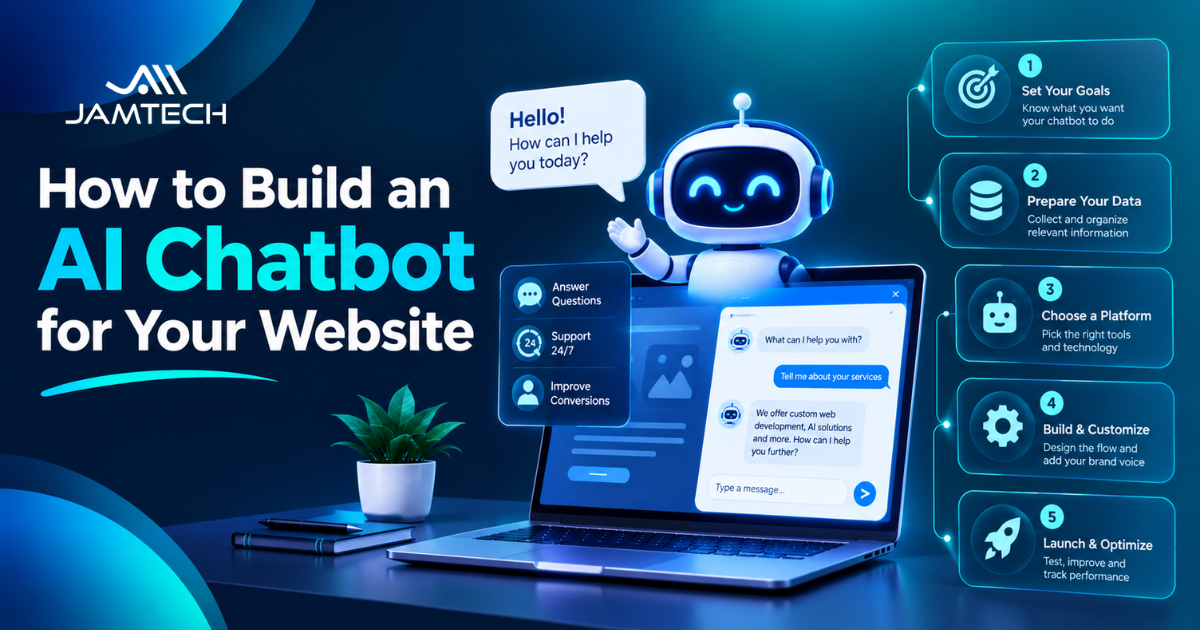
Follow seven steps: define the job, prepare the content, choose a build path, design guardrails and handoff, test, launch narrowly, then measure. The order matters because each step produces something the next one needs. The sequence is a chatbot-sized version of the wider AI development process, which also starts with scope and data before anyone picks a model.
Step 1: Define one job and one success measure
Write the job as a sentence someone else could test, for example: “Answer shipping and returns questions for visitors on product pages.” Then pick one number that shows whether it works, such as the share of conversations that end without a human. A bot scoped to “answer anything” cannot be tested, so nothing tells you when it is ready.
If you are unsure which job to pick first, look at what your support team answers most often. Repeated, low-risk questions with a clear written answer make the best starting point. Your own inbox is a better guide here than any generic list of ideas.
Step 2: Prepare the content it will answer from
Most modern website bots use retrieval-augmented generation (RAG). The system searches your documents for relevant passages, hands them to the model with the visitor's question, and asks it to answer from that text. Patrick Lewis and colleagues described the technique in a 2020 paper, “Retrieval-Augmented Generation for Knowledge-Intensive NLP Tasks”, presented at NeurIPS.
The model matters less than the content. Audit your help pages, policies and product data before you connect anything. The most common failure is two pages that disagree, such as an old returns policy still indexed beside the new one. The bot will quote either. Give each topic one owner and one current page, and remove or redirect the rest.
Format matters too. Split long documents at headings so each passage covers one topic, write tables out as sentences, and store a “last reviewed” date with every page. When a policy changes, those dates tell you which passages to refresh.
Step 3: Choose between a platform and a custom build
A hosted tool from the wide range of chatbot platforms gets a first version live fastest. You paste in your site address or documents, set a tone, and embed a script on your pages. That suits FAQ answers and lead capture. The trade-offs are limited control over retrieval, per-conversation or per-seat pricing that grows with traffic, and thinner logging than you may want.
Before you sign up, test three things on the free trial. Ask a question your documents answer only in part and see whether the bot admits the gap. Check whether you can export full chat logs. Find out how a handoff reaches your team: email, a helpdesk ticket or a live inbox. Run the trial on your own documents, not the vendor's sample pages, because every demo bot answers its own sample content well. A platform that fails any of these checks will cost you more later than it saves now.
A custom build makes sense when the bot must read from your order system or CRM, keep data in a specific region, follow your own handoff rules, or match your brand exactly. It costs more to start and needs someone to maintain it. Teams that need deep system integration often work with a partner for website chatbot development instead of stretching a no-code tool past its limits.
If you also want the bot on WhatsApp, note that the WhatsApp Business Platform, Meta's API for business messaging, has billed per message since 1 July 2025. Meta can change rates on the first day of each quarter, so check the live rate card before you budget.
Step 4: Design guardrails and the human handoff
Guardrails are rules that keep the bot inside its job. Write them into the model's instructions: answer only from retrieved sources, name the page each answer came from, decline topics outside scope, and say “I'm not sure” when the sources do not cover the question.
The stakes are real. In February 2024, the British Columbia Civil Resolution Tribunal ruled in Moffatt v. Air Canada (2024 BCCRT 149) that the airline was responsible for wrong refund information its website chatbot had given a customer. The tribunal rejected the idea that the chatbot was a separate entity and awarded the customer a little over 650 Canadian dollars plus interest and fees. The sum was small. The principle is not: you own what your bot says.
Plan the handoff now. Send the full transcript to a person so the visitor does not repeat themselves. Trigger the handoff on clear signals: low retrieval confidence, two failed rephrases, angry language, or topics such as refunds, medical advice or legal advice. Put a “talk to a person” button on the first screen.
Add a short notice that the visitor is chatting with an AI and what you store. India's Digital Personal Data Protection Rules were notified in November 2025, and most duties, including notices and breach reporting, apply 18 months later, around May 2027. If the chat collects names, phone numbers or emails, draft consent wording now and check it with your legal adviser.
Guardrails matter more once a bot can act, not only answer. If you plan that, read up on what AI agents are first, and begin with read-only actions such as order lookups, where a mistake costs a moment rather than money.
Step 5: Test with 50 real questions before launch
Teams skip this step, and it catches the most problems. Pull 50 real questions from your support inbox, search logs and sales calls. For each, write the expected answer and the page it should come from. Include 10 questions the bot should refuse or hand off, and 10 that are badly phrased, with typos or Hinglish (Hindi written in English letters).
Score every reply as correct, partly correct, wrong or unsafe. Set the pass bar before you test: for example, no unsafe answers and at least 90 percent correct on the questions it should answer. Re-run the full set after every change to content, instructions or model, because a fix for one answer often breaks another.
Step 6: Launch narrowly
Release the bot on one set of pages first, such as the help centre and the pricing page, and keep the human fallback staffed. Read every conversation in the first week. Real visitors ask things your test set missed, and those questions become your next ten test cases.
Step 7: Measure and maintain
Track the share of conversations resolved without a person, the handoff rate, thumbs-down ratings and the questions the bot could not answer. Review the 20 worst conversations each week for the first month, then monthly. Update the knowledge base whenever a price or policy changes, since the bot repeats old text until you replace it.
Once the first job holds up, add the next one. Pick it from the list of chatbot use cases that match your traffic, and give it its own success measure and its own 50-question test set. Adding jobs one at a time keeps a failure traceable to the change that caused it. Keep a short changelog of every edit to content, instructions and model version, with the date and the test score before and after. When answers get worse, the log shows which edit to undo, and it saves hours of guessing.
Should you build in-house or hire a development partner?
Build in-house if you have an engineer who can own retrieval, testing and monitoring after launch. That person also needs authority to change the website content the bot reads, because most fixes are content fixes. Hire if you lack that person, or if the bot must connect to several internal systems such as a CRM, an order database and a helpdesk. A short written brief speeds up any conversation with a vendor: the job, the pages and documents the bot will read, the systems it must touch, and the pass bar from your test set. Agree in writing who fixes a wrong answer and how fast, since a bot that misbehaves on a Sunday night needs an owner, not a ticket queue.
When you compare chatbot development companies, ask to see how they test answers and who owns the code, prompts and conversation data. A vendor who cannot show a test process is selling a demo, not a bot you can rely on.
Ask, too, what happens after launch. A bot needs content updates, test reruns and model changes, and a fixed-price build with no maintenance plan leaves you to do that work alone. Jamtech Technologies publishes this guide and offers chatbot development, so weigh that when you read our advice. The steps above apply whoever builds the bot.
What does a website chatbot cost to run?
Cost has five parts: platform fees or build effort, model usage, integrations, content preparation, and ongoing maintenance. Model providers charge by the amount of text processed, and their price pages change, so work from the live page instead of a rule of thumb. Multiply conversations per month by the average text per conversation, then by the provider's current price.
Then use one metric to compare options: cost per resolved conversation, which is total monthly cost divided by the conversations that ended without a person. A cheap bot that resolves few conversations costs more per answer than a dearer one that resolves most.
Content word count: 1,999.
Frequently asked questions
Q1. How long does it take to build an AI chatbot for a website?
A: A basic FAQ bot on a hosted platform can go live in days, while a custom bot with system integrations usually takes several weeks. Most of that time goes to cleaning content and running tests. Extra languages, order lookups and CRM sync each add work, so scope the first version to one job.
Q2. Can I build an AI chatbot without coding?
A: Yes, hosted platforms let you build one by pasting in your site address or documents and embedding a script. This works well for FAQs and lead capture. The limits show up with deep integrations, custom handoff rules and detailed chat logs, where a custom build gives you more control.
Q3. How much does an AI chatbot for a website cost?
A: Cost depends on five parts: platform fees or build effort, model usage, integrations, content preparation and maintenance. Model providers charge by text processed, so use their live price pages. Compare options by cost per resolved conversation, which is monthly cost divided by chats that ended without a person.
Q4. Do I need ChatGPT to build a website chatbot?
A: No, you need a large language model, but it does not have to be ChatGPT. OpenAI, Anthropic, Google and several open-source model families all work. Pick by accuracy on your own 50-question test set, then check price, data handling terms and where the model runs.
Q5. What is the difference between a chatbot and a RAG chatbot?
A RAG chatbot searches your documents for relevant passages and answers from them, while a plain model chatbot answers from what it learned in training. RAG stands for retrieval-augmented generation. It keeps answers tied to your current content and lets the bot name the page it used.
Q6. How do I stop my chatbot from making things up?
A: You cannot remove wrong answers completely, but you can cut them sharply. Ground the bot in your own content, instruct it to answer only from retrieved sources, and have it say when it is unsure. Then test with real questions and route risky topics to a person.
Q7. How do I add a chatbot to my website?
A: Most platforms give you a short script to paste before the closing body tag, and WordPress and Shopify often have plugins. A custom bot usually runs as a chat widget on your pages that calls your own backend. Add it to a few pages first and check it on mobile.
Q8. Can the same chatbot work on WhatsApp?
A: Yes, through the WhatsApp Business Platform, Meta's API for business messaging. The knowledge base and guardrails can be shared with your website bot. Meta has billed per message since 1 July 2025 and can change rates each quarter, so confirm current prices before you budget for volume.
Q9. Is it legal to use an AI chatbot on my website in India?
A: Yes, but you must handle personal data properly. India's Digital Personal Data Protection Rules were notified in November 2025, and most obligations, including notices and breach reporting, apply 18 months later. If your bot collects names, phone numbers or emails, add clear notices and ask a legal adviser to review them.
Q10. Should a website chatbot tell visitors it is an AI?
A: Yes, say so at the start and offer a route to a person. Visitors trust the bot more when it is honest about what it is, and some regions set transparency rules for systems that talk to people, including the EU AI Act. Check the rules in each market you serve.
Q11. What content does an AI chatbot need to answer well?
A: It needs current, consistent source material: help pages, policy pages, product details, and past support answers that were checked by staff. Remove outdated or conflicting pages first, because the bot will quote either version. Give each topic one owner so updates do not get missed.
Q12. How do I measure whether my chatbot is working?
A: Track the share of chats resolved without a person, the handoff rate, thumbs-down ratings and the questions it could not answer. Read the 20 worst conversations weekly for the first month. If the bot supports sales, also count qualified leads passed to your team.
Q13. How often should I update my chatbot?
A: Update it whenever a price, policy or product detail changes, and re-run your test set after each change. Review conversations weekly for the first month, then monthly. Stale content is the main cause of wrong answers, so assign someone to own the knowledge base.
Q14. What should a chatbot hand over to a human?
A: Hand over anything with legal, medical or money risk, angry visitors, and questions the bot has failed to answer twice. Send the full transcript so the visitor does not repeat themselves. Show a clear button to reach a person from the first screen, not only after a failure.
Ready to grow your business with Jamtech?
Talk to our experts about your next digital project.