



BYOKCALL
Build AI phone agents that answer, book, qualify and follow up on calls, running on your own model keys at provider cost.
Overview
From $19/month · Free to start, no credit card
BYOKCall is an AI calling platform from Jamtech that runs on your own provider accounts. You connect keys for OpenAI, Deepgram, ElevenLabs, Twilio, Telnyx and other services, and each provider bills you directly at its standard rate. BYOKCall charges a flat monthly platform fee and adds nothing to your usage. For most teams, that puts a live AI call at around $0.13 a minute, where many managed voice AI platforms land near $0.35.
You don't need any keys on day one. New accounts start on BYOKCall credits, so you can build an agent in the visual workflow builder and hear it answer a real call in about seven minutes. Inbound reception, outbound campaigns, appointment booking and support calls all run from the same account, with a knowledge base, CRM actions and call analytics included in every plan. When you are ready, connect your own keys and the per-minute cost drops.
What you get
-
Your own provider keys
Connect OpenAI, Deepgram, ElevenLabs, Twilio or Telnyx. Each provider bills you directly, and BYOKCall adds no per-minute markup.
-
Visual workflow builder
Map greetings, questions, transfers and hang-ups on a canvas. Flows are versioned, so you can test a change before publishing it.
-
Outbound calling campaigns
Upload a contact list and dial with concurrency limits, retries and calling windows. Campaigns pause on their own if failures spike.
-
24/7 AI receptionist
Answer every inbound call, after hours included, then book, route or take a message based on what the caller asks for.
-
Knowledge base answers
Upload your docs once. Agents look up answers from them mid-call, so callers get your real policies and prices.
-
Actions during the call
Create a lead, call your API or fire a webhook while the caller is still on the line, then push the outcome to your CRM.
-
Fast, natural replies
The median round trip across telephony, transcription, model and voice is about 148ms, so callers aren't left waiting in silence.
-
Cost and call analytics
See minutes used, live calls, dispositions and per-provider cost on one dashboard before you open a single report.
What is BYOKCall?
BYOKCall is an AI phone agent platform where you bring your own API keys. Instead of paying a voice AI company one bundled rate per minute, you connect your own OpenAI, Deepgram, ElevenLabs and Twilio accounts, and each of them bills you directly. BYOKCall charges a flat monthly fee for the software that runs the calls.
That software does the hard part of a phone conversation. When someone calls, their voice comes in over the phone line, gets transcribed, goes to a language model that works out the reply, and comes back to them as speech in about 148 milliseconds. BYOKCall coordinates each of those steps, keeps the agent on script and logs what happened. You choose which provider sits at each step, and you can change it later without rebuilding the agent.
For a business, this changes two things. The first is price. Running on your own keys usually works out to about $0.13 a minute, against roughly $0.35 on all-in managed platforms. The second is control. Your API keys, call recordings and provider contracts stay in your name, which matters to companies doing their own AI development or working under strict data rules.
BYOKCall is built by Jamtech, a software company with offices in Lucknow and Austin. You can sign up free, build your first agent on included credits, and add your own keys once real call volume starts. Businesses that need more than the standard product, such as a custom dialer or two-way text messaging, can work with Jamtech on tailored SMS and calling solutions.
BYOKCall platform modules
Each module handles one part of running AI phone calls, from designing what the agent says to checking how each call went afterwards.
-
Workflow builder
Design the conversation as a flow on a visual canvas: greeting, agenda, questions, transfers to a human and hang-up. You don't write code. Every flow is versioned, so you can draft changes, publish when ready and roll back if a new script performs worse.
-
Campaign manager
Run outbound calls from an uploaded contact list. Pick a workflow, set how many calls run at once, choose calling hours and decide how retries work. If too many calls fail in a row, a circuit breaker pauses the campaign so a bad list or carrier issue doesn't burn through minutes.
-
Inbound call handling
Point a phone number at an agent and it picks up every call, day or night. It can answer common questions, book a slot, qualify the caller or hand off to your team when a person is needed.
-
Knowledge base (RAG)
Upload FAQs, price lists, policies or product docs. During a call the agent searches these files and answers from them, which keeps replies accurate and cuts down on made-up answers.
-
Tools and webhooks
Give agents actions they can take mid-call. They can create a lead, check an order through your API, fire a webhook to your automation tool or write the call outcome to your CRM.
-
Provider key vault
Add keys for your LLM, speech-to-text, voice and telephony providers in one place. Keys are stored encrypted, used only when your agent places or takes a call, and can be revoked whenever you like.
-
Phone numbers and telephony
Connect numbers from Twilio, Telnyx, Plivo, Vonage or your own Asterisk setup. Different agents can run on different numbers, which suits businesses with several locations or agencies serving several clients.
-
Analytics and call runs
Review every call with its transcript, duration, disposition and cost. The home dashboard shows plan usage, remaining minutes and live call stats, so you can spot problems before they show up in your numbers.
-
Agent templates
Start from ready-made flows for reception, appointment booking, lead qualification and support instead of a blank canvas. Change the script, voice and questions to fit your business, test a call, then publish it to a live number.
Key features of BYOKCall
These are the parts of BYOKCall that matter most once agents are taking real calls every day.
-
No markup on usage
You pay OpenAI, Deepgram, ElevenLabs, Twilio and other providers at their normal rates. BYOKCall charges one flat platform fee, so the cost per call doesn't creep up as volume grows.
-
Switch any layer without rebuilding
Change your LLM, voice, transcription or telephony provider from settings. Existing workflows keep running, so you can test a cheaper model or a better voice in minutes.
-
Start on credits, add keys later
Build and test your first agent on BYOKCall credits with no provider setup. Connect your own keys when you're ready to see provider costs line by line.
-
Low-latency conversations
A median round trip of about 148ms keeps the back-and-forth natural. Callers can interrupt and get a quick reply instead of waiting through long pauses.
-
Safe outbound at scale
Concurrency limits, smart retries, calling-window schedules and an automatic circuit breaker keep large campaigns under control.
-
Multiple agents and numbers
Run separate agents for sales, support and booking, or for different clients, from one account. Plans scale from one agent on Launch to more on Scale and Pro.
Who uses BYOKCall
Businesses that depend on the phone use BYOKCall to answer every call and make more outbound ones, without adding staff for every shift.
-
Small businesses that miss calls
Owners who can't pick up during a job or after closing time. The agent answers, takes the details and books the next step, so the caller doesn't ring a competitor instead.
-
Clinics and medical practices
Patients call to book, reschedule or ask about timings at all hours. The agent handles those calls and leaves the front desk free for people at the counter.
-
Dental offices
Fill empty slots with booking calls and send day-before reminders by phone, so fewer patients miss appointments and the chair stays busy all week.
-
Real estate agents and brokers
Call every new portal lead within minutes, ask about budget, area and timeline, and pass serious buyers to an agent.
-
Law firms
Take intake calls, collect the basic facts of a matter and book consultations without pulling a paralegal off billable work.
-
Online stores
Answer "where is my order" calls, confirm cash-on-delivery orders before dispatch and run feedback calls after delivery.
-
SaaS and software companies
Call new trial signups, follow up after demos and handle first-line support questions with answers pulled from your help docs.
-
Voice AI agencies
Build agents for multiple clients on one account, use separate numbers per client, and add your own margin over a flat platform fee.
-
Insurance and lending teams
Remind customers about renewals and due payments, and pre-qualify new applicants before an advisor calls them back.
-
Developers and in-house tech teams
Choose your own models and carriers, connect agents to internal APIs, and keep API keys and call data inside the accounts your team controls.
How BYOKCall works
Getting an AI phone agent live takes four steps, and most people finish them in about seven minutes.
-
1. Create your account
Sign up free with no credit card. Your account starts with BYOKCall credits, so you can build without setting up any provider yet.
-
2. Build your call flow
Pick a ready-made template or start blank in the workflow builder. Set how the agent greets callers, what it asks, when it books or transfers, and how it ends the call.
-
3. Connect a number and your keys
Add a phone number from Twilio, Telnyx or another carrier. When you want lower per-minute costs, add your own LLM, speech and voice keys.
-
4. Go live and review calls
Turn on inbound answering or launch an outbound campaign. Check transcripts, outcomes and cost on the dashboard, then adjust the flow as you learn what works.
BYOKCall vs managed voice AI platforms
Here's how BYOKCall compares with all-in managed platforms in the Vapi, Retell and Bland class at the same call volume.
| Capability | BYOKCall | Managed platforms (Vapi, Retell, Bland) |
|---|---|---|
| Typical cost per minute | Around $0.13/min on your own keys | Around $0.35/min all-in |
| Markup on usage | None. Providers bill you directly | Built into the per-minute rate |
| Your own provider keys | Yes, for LLM, STT, TTS and telephony | Limited or plan-dependent |
| Switching models or voices | Anytime from settings, no rebuild | Usually limited to the platform's supported stack |
| Billing visibility | Line-by-line cost from each provider | One blended per-minute rate |
| Platform pricing | Flat fee from $19/month | Usage-based, rises with every minute |
| Outbound campaign controls | Concurrency, retries, calling windows and auto circuit breaker built in | Varies; some controls need extra API work |
| Data and model training | Calls flow through your providers; not used for training | Depends on each platform's policy |
| Vendor lock-in | None. Keys, numbers and accounts stay yours | Agents tied to the platform |
BYOKCall use cases
One account covers most of the calls a business makes or receives in a normal week.
-
AI receptionist
Answer every call, share opening hours and pricing, take messages and route urgent calls to the right person.
-
Appointment booking
Book, reschedule and cancel appointments over the phone, then send the details to your calendar or booking system.
-
Customer support
Resolve common questions using your knowledge base and escalate harder issues to a human with the context attached.
-
Lead qualification
Call new leads quickly, ask your qualifying questions and push qualified prospects straight into your CRM.
-
Follow-up calls
Check in after a quote, demo or service visit so no warm lead or customer goes quiet without a second contact.
-
Payment reminders
Remind customers about due or overdue invoices politely and log whether they agreed to a payment date.
-
Order status calls
Tell callers where their order is, confirm delivery details and handle simple changes without a support ticket.
-
Surveys and feedback
Run short phone surveys after a purchase or appointment and save each answer for later analysis.
-
Candidate screening
Ask applicants your first-round screening questions by phone and share a summary with your hiring team.
-
AI sales calling
Call past customers and warm prospects about offers and renewals, then pass interested buyers to your sales team.
BYOKCall integrations
BYOKCall works with the AI and telephony providers you probably already use, plus your own systems through webhooks and APIs.
-
OpenAI
Use GPT models as the language layer that understands callers and decides what the agent says next.
-
Groq
Run fast open models on Groq when response speed and lower model cost matter most.
-
Deepgram
Transcribe callers in real time with Deepgram speech-to-text, or use its voices for text-to-speech.
-
AssemblyAI
An alternative speech-to-text option for accurate transcription across accents and noisy lines.
-
ElevenLabs
Give your agent a natural, expressive voice from the ElevenLabs library, or use a custom voice for your brand.
-
Cartesia
Low-latency text-to-speech that keeps replies quick in fast-moving conversations.
-
Twilio
Connect Twilio phone numbers for inbound and outbound calls in most countries.
-
Telnyx
Use Telnyx numbers and voice infrastructure as a cost-effective telephony option.
-
Webhooks and CRMs
Send leads, bookings and call outcomes to your CRM, helpdesk or automation tools through webhooks and API calls.
-
Google Gemini
Use Gemini as the language layer, or test it against OpenAI on live calls to compare cost and quality.
Security and support
With BYOKCall, your keys, call data and billing stay tied to your own provider accounts. Audio and transcripts move through the providers you chose, under your keys, and BYOKCall does not use your calls to train AI models. API keys are stored encrypted and decrypted only at the moment an agent needs them to place or answer a call, so you can revoke access at any time from the provider side or the dashboard.
BYOKCall is built and run by Jamtech, an ISO/IEC 27001:2022 certified company, and the platform's infrastructure is handled by our in-house cloud and DevOps engineers. A Data Processing Agreement is available for businesses that handle customer data under GDPR or similar rules.
If you need a security review before rollout, or want the platform connected to systems that hold sensitive records, you can work with our cybersecurity engineering team on access controls and data flows.
-
Encrypted key storage
Provider keys are encrypted at rest and only decrypted when a call is in progress.
-
Revoke access anytime
Remove or rotate a key from your dashboard or provider account, and BYOKCall stops using it immediately.
-
No training on your calls
BYOKCall does not use your audio or transcripts to train models. Data flows through your own providers.
-
Data Processing Agreement
A DPA is available alongside the Terms of Service and Privacy Policy for teams with compliance needs.
-
No vendor lock-in
Your keys, numbers and provider accounts stay yours, so you can move or export your setup without starting over.
-
Support from the people who built it
Paid plans include priority support from Jamtech engineers, plus help with custom integrations if you need them.
Inside the BYOKCall platform
A look at the screens you'll use to build agents, run campaigns and track every call.
-
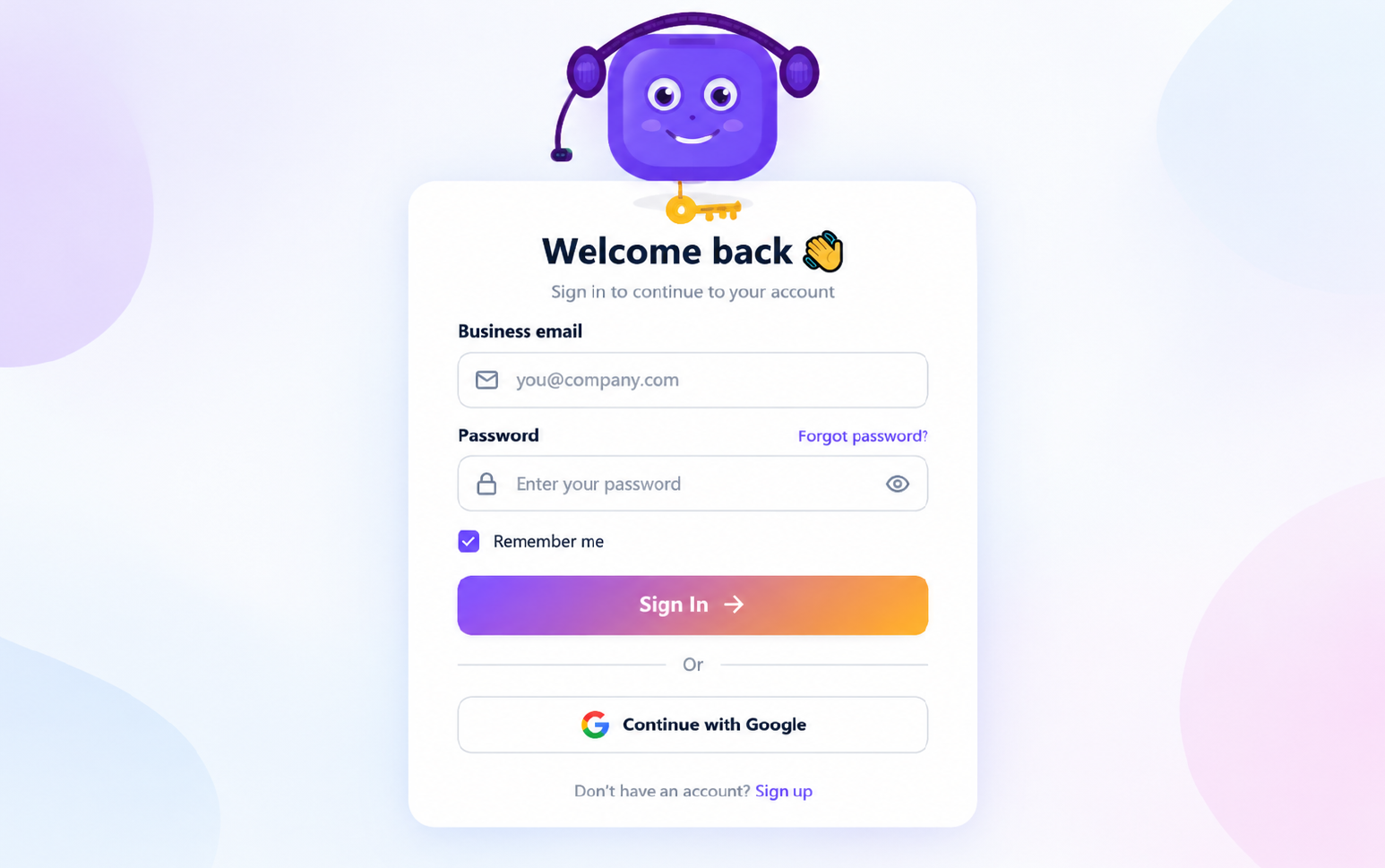
Sign in with your work email or Google account to get to your agents, phone numbers and call history. -
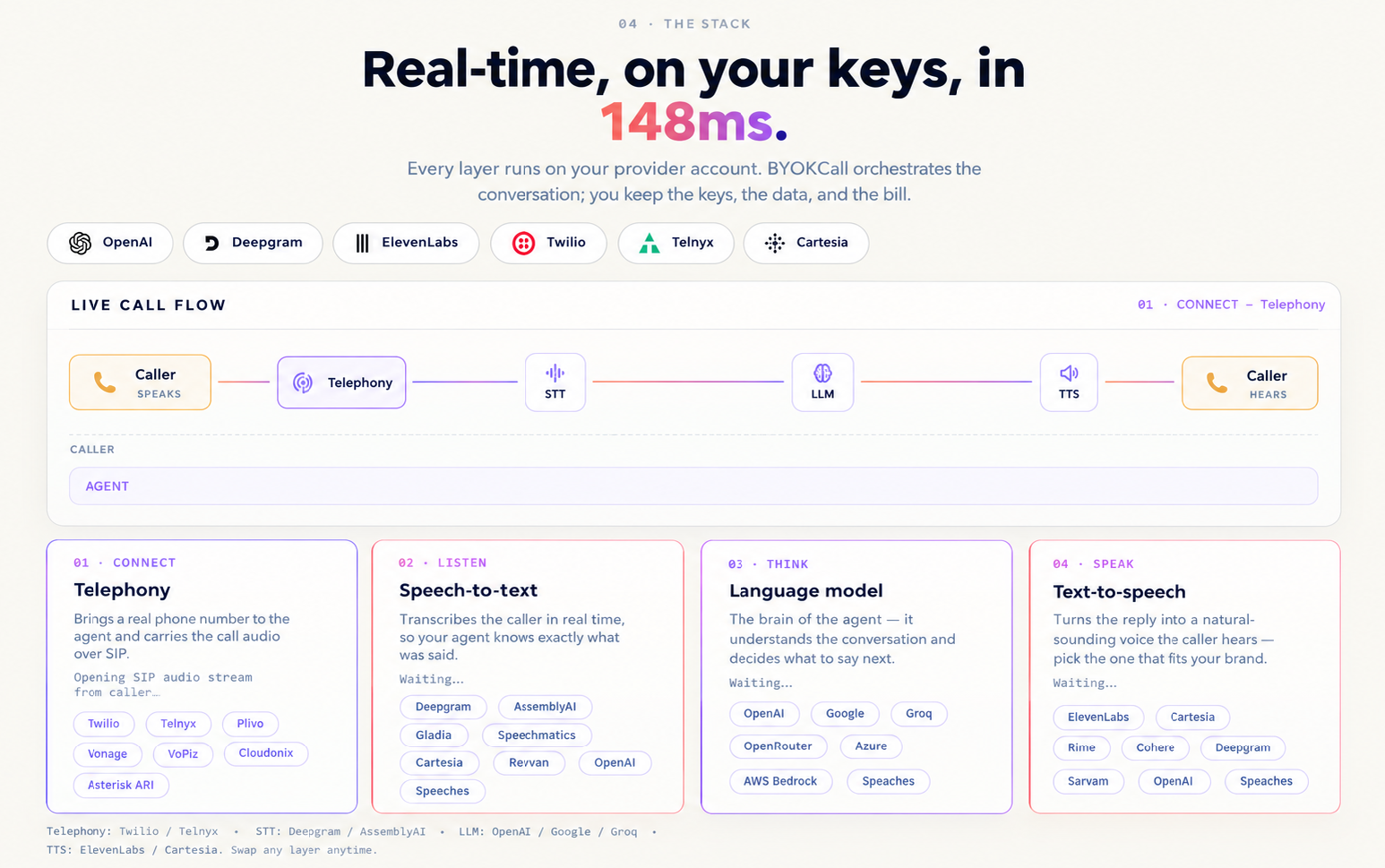
Pick your own provider for each step of the call, and swap any of them later without rebuilding the agent. -
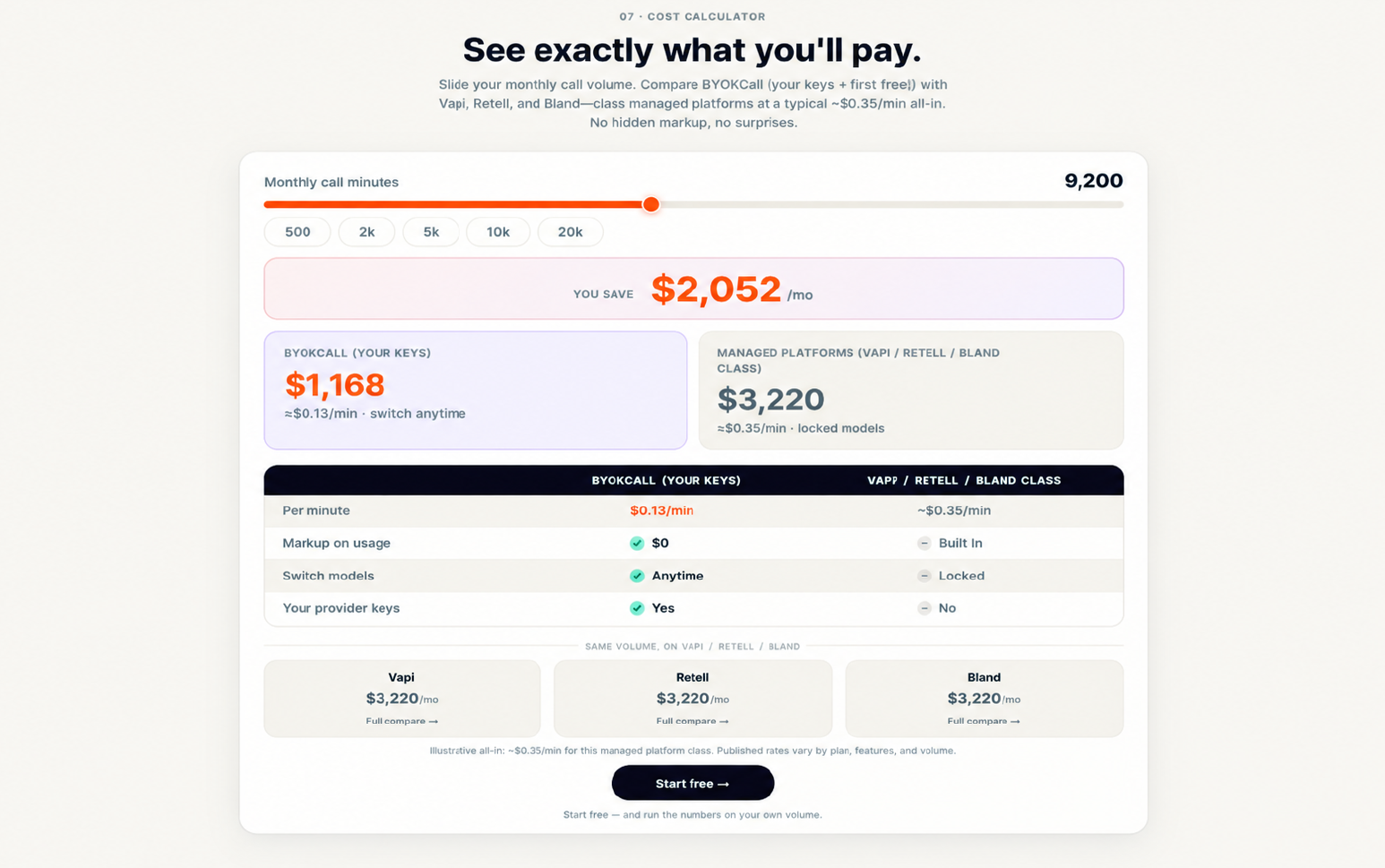
Move the slider to your monthly call volume and see how much you would save compared with managed voice AI platforms. -
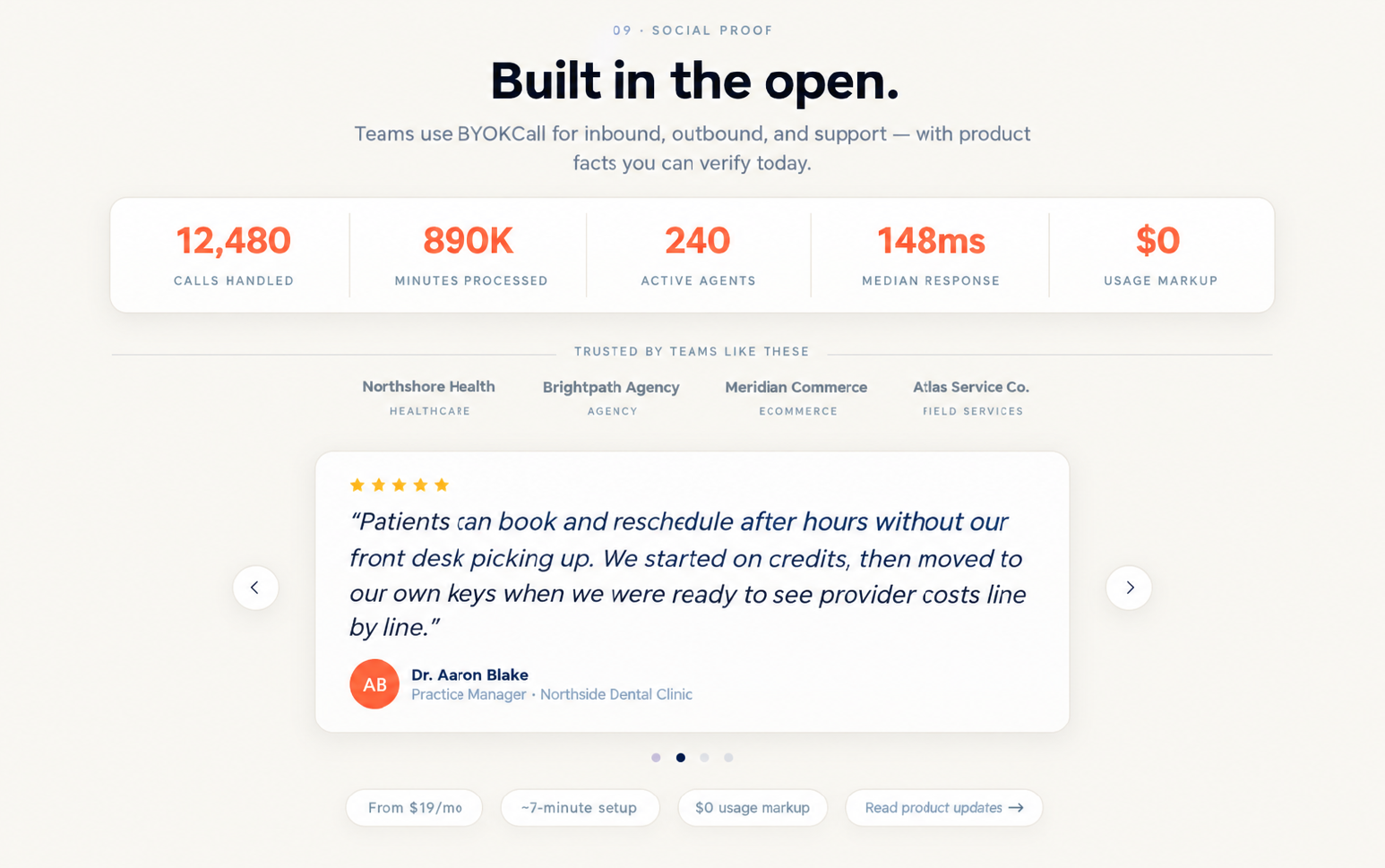
Usage numbers and customer feedback from teams running inbound, outbound and support calls on BYOKCall.
Frequently asked questions about BYOKCall
BYOKCall is an AI calling platform that lets businesses build phone agents on their own API keys. The agents answer calls, book appointments, qualify leads and run outbound campaigns. You pay providers like OpenAI and Twilio directly, plus a flat platform fee from $19 a month.
BYOK stands for "bring your own key." You connect your own accounts for the language model, speech-to-text, text-to-speech and telephony, and each provider bills you at its normal rate. The platform doesn't resell those minutes with a markup.
Plans start at $19 a month (Launch), with Scale at $49 and Pro at $99. Call usage is billed by your providers at their own rates. On your own keys, a typical call costs around $0.13 per minute.
No. New accounts start on BYOKCall credits, so you can build and test an agent with no provider setup and no credit card. You can connect your own keys later to lower your per-minute cost.
For language: OpenAI, Google, Groq, Azure, AWS Bedrock and OpenRouter. For transcription: Deepgram, AssemblyAI, Gladia and Speechmatics. For voice: ElevenLabs, Cartesia, Rime and Deepgram. For telephony: Twilio, Telnyx, Plivo, Vonage and Asterisk.
For most call volumes, yes. Managed platforms in the Vapi, Retell and Bland class often work out to around $0.35 per minute all-in. BYOKCall on your own keys runs closer to $0.13, so 2,000 minutes a month costs roughly $268 instead of $700.
Yes. Upload a contact list, choose a workflow and launch a campaign. You control how many calls run at once, when calls go out and how retries work, and the campaign pauses itself if the failure rate gets too high.
Yes. A BYOKCall agent can check availability, book, reschedule or cancel appointments during the call and send the details to your calendar or CRM through webhooks.
No. Audio and transcripts go through the providers you connected, under your keys. BYOKCall does not train models on your calls, and your keys are stored encrypted.
About seven minutes for a basic agent. You sign up, pick or build a call flow, connect a phone number and go live. Adding your own provider keys takes a few more minutes when you're ready.
Put your first AI phone agent to work today
Start free on BYOKCall credits, build an agent in minutes and connect your own keys when you want provider-level pricing. No credit card, no usage markup, and you can talk to the Jamtech team anytime if you need a custom setup.
More products
-
BULLCRM
Modular CRM for sales, marketing, and operations — enable the modules you need as your team scales.
-
ReplyMind AI
AI auto-reply for messaging apps — smart personas, BYOK, and privacy-first automation.
Talk to Our Lucknow Engineers Who'll Actually Build Your Product
Get a free 30-minute consultation with our senior team, no sales reps, no scripts. Walk away with a clear scope, realistic timeline, and fixed-price estimate for your project.