



AI Agents vs Chatbots: Which One Does Your Business Need?
A chatbot answers questions, while an AI agent plans steps and uses tools to finish a task. Here is how to choose between the two.

What is the difference between an AI agent and a chatbot?
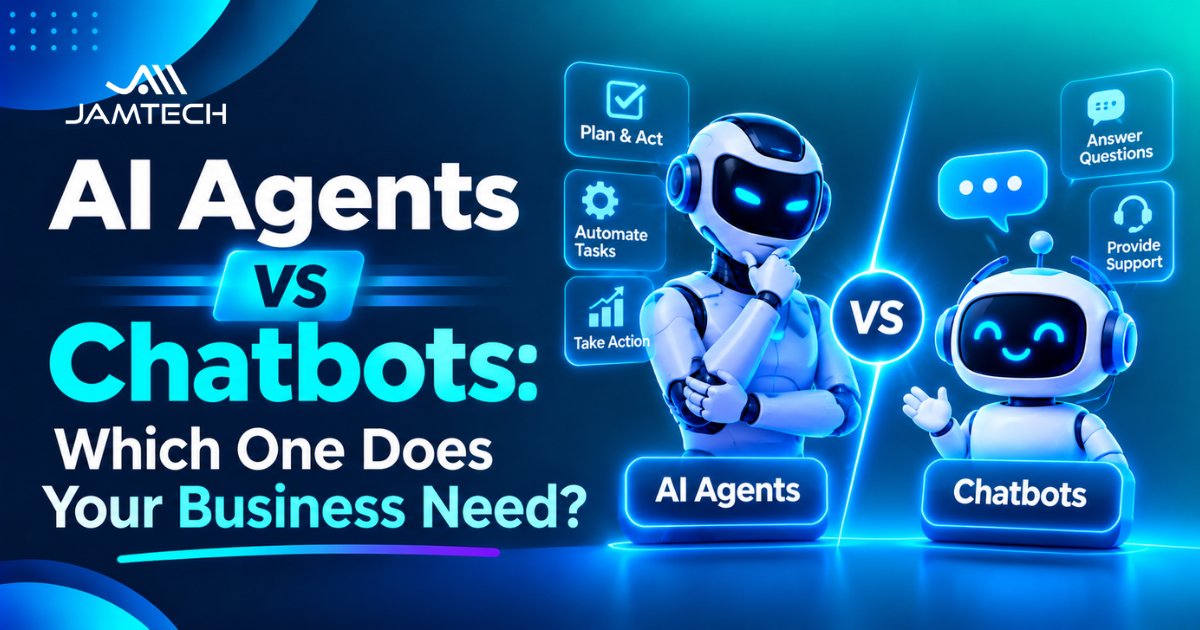
A chatbot is built around a conversation. The visitor asks, the bot replies, and the exchange ends when the question is answered. An AI agent is built around a task. It receives a goal, decides which steps to take, calls tools to take them, checks the results and keeps going until the task is done or it needs help.
Anthropic drew a useful line in its December 2024 engineering post on building agents. It calls a system a workflow when the model and tools follow paths written in advance by developers, and an agent when the model decides its own steps and tool use. The post also advises finding the simplest solution that works, which it says may mean not building an agent at all. That advice applies to most business problems.
If you want the full definition and the parts inside an agent, the guide to what AI agents are covers them. For this comparison, one idea is enough: a chatbot talks, and an agent acts.
How do they behave on the same request?
Take one message from a customer: “My parcel has not arrived and it was due yesterday.”
A basic chatbot finds the delivery policy in your help pages and replies with the standard delay window and a link to the tracking page. It is fast and predictable, and it does nothing in your systems.
A chatbot with a fixed workflow asks for the order number, calls your order system, reads the status and replies with it. If the status says delayed, it offers the next steps from a fixed script. Every step was decided in advance, so it behaves the same way each time.
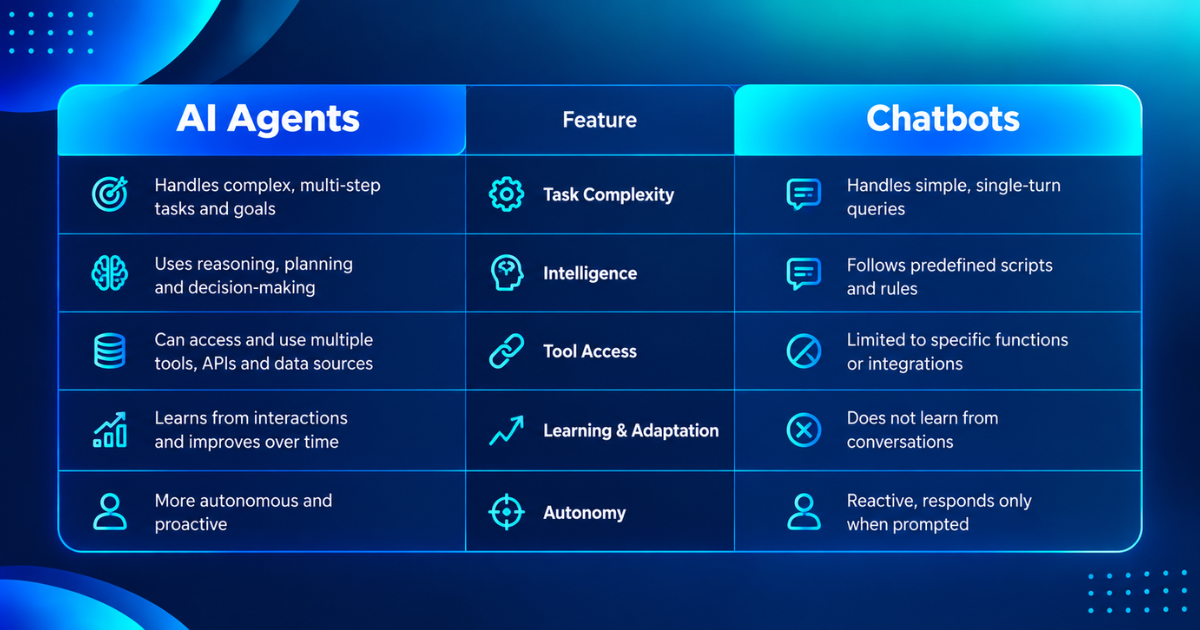
An agent starts the same way and then branches. It reads the order, sees that the courier marked the parcel as delivered to a neighbour, checks the delivery photo, compares the case with your refund rules, and chooses between asking the courier to investigate, offering a replacement or issuing a refund below your limit. It explains what it did and asks a person to approve anything above the limit.
The agent solves more of the problem, and it also has more ways to go wrong. A wrong answer from a chatbot costs a moment. A wrong refund from an agent costs money. That difference drives the whole decision.
Is there a middle ground between a chatbot and an agent?
Yes, and most good systems sit there. Think of four levels. At level one, the bot only answers from your content. At level two, it answers and runs a few fixed actions, such as looking up an order or booking a slot. At level three, it is an agent that plans its own steps but asks a person to approve anything that changes a record. At level four, it acts alone within strict limits.
Moving up a level adds value and risk together, so move one level at a time and measure each move. If you are still choosing between a scripted bot and a model-based one at level one, the comparison of rule-based vs AI chatbots shows where each fits. Many teams find that level two solves most of their problem and never need level four.
When does a chatbot do the job better?
A chatbot fits when the questions repeat, the answers already exist in writing and a wrong answer is cheap. Order status, opening hours, returns policy, product questions and lead capture all fit. A chatbot is also easier to test, because the set of likely questions is finite, and easier to audit, because it takes no actions.
It costs less to run as well. Anthropic's post notes that agentic systems tend to trade latency and cost for better task performance, which means an agent makes more model calls to finish one task. If a simple bot can resolve the request, the agent's extra calls are wasted money.
Gartner made a related point in June 2025. It said many use cases presented as agentic today do not need an agentic implementation, and it warned about “agent washing”, the relabelling of chatbots, assistants and robotic process automation as agents. Gartner estimated that only about 130 of the thousands of vendors claiming agentic products offer real agentic capability. Before you pay for an agent, ask whether a better chatbot would solve the same problem.
When do you actually need an AI agent?
You need an agent when the task has several steps, the path changes with the case, and the work touches more than one system. Refund handling that checks the order, the policy, the payment record and the customer history is one example. Scheduling across several calendars with changing constraints is another. So is gathering information from several sources and writing a summary with citations.
Signs that you are in agent territory include exceptions that staff currently handle by judgment, tasks that involve reading and then acting, and processes where a fixed script would need dozens of branches. The list of business tasks AI agents handle gives worked examples, along with the tools and permissions each one needs.
Signs that you are not include a single question with a single answer, a process that fits a short script, and a task where nobody can say what a correct result looks like. In those cases, build a simpler bot first and learn from the conversations.
How do you decide? Use the undo test
Here is a practical rule that works better than any feature checklist. For every action an agent could take, ask whether you could undo it within a minute.
Reversible actions are safe to automate: looking up a record, drafting a reply, tagging a ticket, suggesting a time slot. Let the agent do these on its own once testing supports it. Costly-to-undo actions need limits or approval: issuing a refund under a set amount, rescheduling a delivery, changing an address. Allow them with a cap, a log and a person who reviews a sample. Review the three lists every quarter, since an action you trusted last month can change category when the amount or the type of customer changes. A small refund may be routine, while a large one with the same steps is not. Irreversible actions stay with people: sending a contract, deleting data, making a large payment, anything a customer would see as a commitment.
Then add four questions. Does the task need actions, or only answers? Does the path change from case to case? Can a person check the result quickly? What does a wrong action cost, and who pays? If the answers are “answers only”, “no”, “yes” and “little”, build a chatbot. If they are “actions”, “yes”, “yes” and “small or reversible”, an agent with limits fits. If the last answer is “a lot”, keep a person in the loop whatever the technology.
What does each one cost to build and run?
An agent costs more at every stage. It needs tool connections, permission design, a test set that covers actions as well as answers, logging of every step and more monitoring after launch. Each task also uses more model calls than a chatbot reply does.
The risk of overspending is real. Gartner predicted in June 2025 that more than 40 percent of agentic AI projects would be canceled by the end of 2027, citing escalating costs, unclear business value and inadequate risk controls. Most of those projects, it said, were early experiments driven by hype. The way to avoid joining them is to fund one narrow task, measure it and expand only when the numbers support it.
Track cost per completed task, which is total monthly cost divided by tasks finished correctly. Compare it with what a person costs for the same task, and count the review time that remains.
What do you need before building an agent?
Five things. First, a task you can describe in one sentence with a clear definition of done. Second, tools with narrow permissions, so the agent can read before it can write and write before it can send. Third, a test set of 50 or more scenarios, including bad inputs, angry customers and attempts to push the agent past its limits. Fourth, logs that record each step, each tool call and each result, with timestamps. Fifth, a human override and an escalation route that work from day one. Test the override before launch by stopping an agent in the middle of a task and checking that nothing is left half done, such as a refund issued without the matching record.
Developers often ask which framework to use. A comparison of AI agent frameworks can save time, but Anthropic's post gives a warning worth repeating: frameworks add layers that can hide the prompts and responses underneath, and they can tempt you to add complexity you do not need. Start with direct calls to a model, understand the loop, and adopt a framework only when it removes real work. If you do pick one, check that you can see the exact prompts and tool calls it sends, and that you can run it against your own test set. A framework that fails the first check makes every bug harder to find. Write each tool's description plainly, with an example of correct use, because vague descriptions are a common cause of wrong tool calls.
How should you start?
Climb the levels. Launch a chatbot that answers from your content and measure its resolution rate. Add one read-only tool, such as order lookup. Add draft actions, where the system prepares a refund and a person approves it. Move to limited autonomy only after the logs show that approved actions are almost always correct, and keep a cap on the amount and the count.
Teams that need custom tool integration, permission design and evaluation often work with a partner for agentic AI development instead of building the control layer from scratch. When you speak to any vendor, ask them to demonstrate a failure: show the agent being given a task it should refuse, and show how the system stops it. A vendor who can only show success stories has not tested enough.
Jamtech Technologies publishes this guide and offers AI agent development, so weigh that when you read our advice. The undo test and the four questions work whoever builds the system.
Frequently asked questions
Q1. What is the main difference between an AI agent and a chatbot?
A chatbot answers questions inside a conversation, while an AI agent works toward a goal by planning steps and using tools such as a CRM or calendar. A chatbot talks, and an agent acts. That is why an agent can do more and also carries more risk.
Q2. Can a chatbot become an AI agent?
Yes, in stages. A bot that only answers can gain read-only tools, then draft actions that a person approves, then limited autonomy within caps. Each stage adds risk, so test and measure before moving up. Many teams find that fixed actions solve most of their problem.
Q3. Are AI agents better than chatbots?
Not always. Agents suit multi-step tasks across several systems with changing paths, but they cost more and fail in more ways. Chatbots are cheaper, easier to test and audit, and enough for repeated questions with written answers. Choose by the task and the cost of a mistake.
Q4. Which is cheaper to run, an AI agent or a chatbot?
A chatbot is usually cheaper. An agent makes more model calls per task, needs tool connections, permission design, richer testing and more monitoring. Compare options by cost per completed task, which is monthly cost divided by tasks finished correctly, including the review time that remains.
Q5. When should a business choose a chatbot?
Choose a chatbot when questions repeat, answers already exist in writing, and a wrong answer is cheap. Order status, opening hours, returns policy and lead capture are typical. A chatbot is also the better first step when you cannot yet say what a correct result looks like.
Q6. When should a business choose an AI agent?
Choose an agent when a task has several steps, the path changes with the case, and the work touches more than one system, such as refund handling that checks orders, policy and payments. Keep approvals and caps on any action that is costly to undo.
Q7. What is agent washing?
Agent washing is the relabelling of existing products, such as chatbots, assistants and robotic process automation, as agentic AI without real agentic ability. Gartner described it in June 2025 and estimated that only about 130 of thousands of claimed agentic vendors were real. Ask any vendor to demonstrate a failure case.
Q8. Are AI agents safe to use with customers?
They can be, with limits. Give the agent narrow permissions, let it read before it writes, cap amounts and counts, log every step, and keep a human override. Keep irreversible actions, such as sending contracts or deleting data, with people. Test with bad inputs and angry customers before launch.
Q9. What is the undo test for AI agents?
The undo test asks whether you could reverse an action within a minute. Reversible actions, such as drafting or tagging, can be automated. Costly ones, such as small refunds, need caps, logs and sampled review. Irreversible ones, such as sending a contract, stay with people.
Q10. Do AI agents need human oversight?
Yes, at least for actions that change records or cost money. Start with approval on every write action, then relax it for categories where logs show approved actions are almost always correct. Keep a human override and an escalation route that work from the first day.
Q11. How long does it take to build an AI agent compared with a chatbot?
A simple chatbot on a hosted tool can run in days, while an agent usually takes longer because of tool integration, permissions, an action-level test set and monitoring. Data readiness and approval design are the usual causes of delay. A short prototype on real tasks gives a better timeline.
Q12. Can an AI agent replace customer support staff?
It can take over routine, reversible tasks, but it rarely replaces a whole team. Staff still handle unusual cases, upset customers, approvals and review of failures. A better aim is to reduce repetitive work and give people time for the cases that need judgment.
Q13. What should I ask a vendor who sells an AI agent?
Ask for a live demo on your own tasks, including a failure case where the agent should refuse. Ask what tools and permissions it needs, how every step is logged, how the override works, who owns the data and logs, and what the cost per completed task is.
Q14. Is an agent the same as an automation workflow?
No. In a workflow, developers fix the steps in advance and the model fills in parts of them. In an agent, the model chooses its own steps and tools. Anthropic drew this distinction in December 2024. Workflows give more predictability for well-defined tasks.
Ready to grow your business with Jamtech?
Talk to our experts about your next digital project.